
Systems engineering for the age of AI agents
Give AI agents the tools to engineer real systems.
Vector Stream Systems connects AI agents to one integrated system model: its requirements, constraints, calculations and verification. Iterate on a design change, see its impact across the system, and keep every engineering decision traceable.
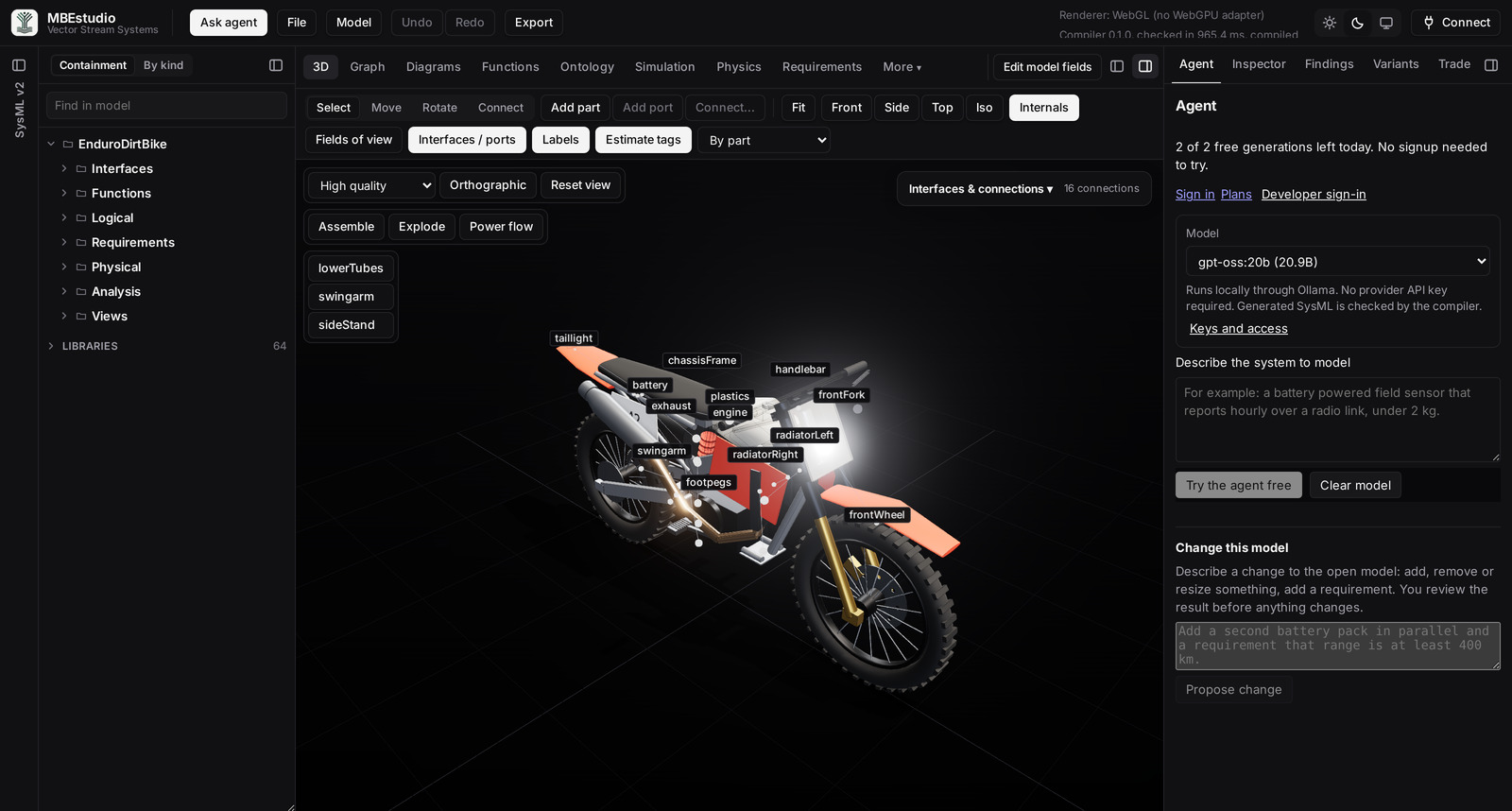
The full studio is built for a desktop browser and a mouse. On a phone, this screenshot previews the enduro dirt bike, and Try the studio opens a phone view where you can describe a system, see it in 3D and browse its components. Open this page on a laptop or desktop to explore every view.
MBEstudio is under active development and is updated intermittently, so you may occasionally run into an issue. For problems or support, email streamline@vectorstreamsystems.com.
Agents do the work
An agent can author a system specification, generate a SysML v2 model, run its state machines and sweep its trade study, instead of only answering questions about engineering.
Engineering provides the ground truth
A compiler, declared constraints, executable requirements and simulation return findings an agent cannot talk its way around. A plausible design still has to pass them.
Engineers stay in control
Every agent job is estimated before it runs, capped by a limit you set, and lands in your workspace with its source, findings and unresolved inputs open to review.
The engineering gap
AI can generate a design. Can it demonstrate that the design works?
Systems engineers already use AI to draft models, write analysis scripts and explore architectures. The work ends up spread across documents, code, spreadsheets, modeling tools and a chat history. Producing the artifacts is no longer the hard part. An AI that does engineering has to trace every requirement to the design, show the impact of every change, and keep one integrated system consistent while the design is iterated.
Traceability, not just generation
Every requirement is tied to the parts, interfaces and equations that satisfy it, so an engineer can follow any result back to the design that produced it.
Impact analysis on every change
Resize a part or swap a component and every requirement, budget and interface that depends on it is evaluated again in the same model.
One integrated system
Structure, requirements, behavior and geometry live in one SysML v2 source that people and agents work on together, instead of files that drift apart.
Iterate, then verify again
Each design change is checked against the same requirements, so a team can iterate quickly and still know where the design stands.
Calculations from the model
A number an agent computed in conversation is recomputed from the model's own equations and inputs, and the result can be reproduced.
Gaps stay visible
A missing input or unstated assumption stays unresolved rather than filled in with a plausible value.
How it works
Your agent does the engineering. The model checks every step.
The agent proposes a design. MBEstudio evaluates it against every requirement in one integrated model and reports what passed, what failed and what is still unknown. The agent fixes what failed and runs the checks again. You review the result before you rely on it.
Read the system
AvailableThe agent pulls the model's requirements, parts, interfaces and BOM, so it starts from the real design instead of a description of it.
Propose a design
AvailableThe agent writes the system as parts, interfaces, constraints and requirements with units. MBEstudio compiles it into a SysML v2 model with geometry.
Check it against every requirement
AvailableThe compiler, shape checks, state machine runs and trade sweeps return a verdict for each requirement: pass, fail or not enough data.
Fix what failed
Agent drivenThe agent reads each failure, revises the design and runs the same checks again until the verdicts change.
You review the evidence
Partly availableThe change, its impact and every verdict land in your studio workspace. Federated work comes back as conflicts to approve or reject; a separate approve-or-reject step for other agent changes is not built yet.
The agent interface
Bring the agent you already use
MBEstudio is a remote MCP server. Connect Claude Code, Codex, Cursor, ChatGPT or Claude Desktop, sign in with your account email, and your agent gets the same engineering operations the studio runs. You are not locked into one assistant.
Paid tools show their cost first and refuse any job above the limit you approve. Describing the service, estimating, checking a balance, polling a job and reading its result are free. A specification your agent writes is validated for free before anything is charged.
The tool sequence on the right is illustrative and built from the documented interface; it is not a recorded session.
Want practice built into the agent itself? The Systems Engineering Skill Pack adds requirements, safety and traceability skills, and one skill is free.
- agent attempts · estimate_cost
Submits its specification for a free check. A requirement on an attribute no component declares comes back as a blocker before any charge.
- agent revises · generate_system_model
Declares the missing attribute, re-estimates, and runs within the approved limit. MBEstudio compiles the specification into a SysML v2 model.
- mbestudio executes · verify_model
Runs the native compiler and the supported shape checks. Returns each finding with the coverage it applies to, so unchecked areas are explicit.
- mbestudio executes · run_simulation
Runs the declared state machines. Returns transitions, requirement verdicts over time and any events the model did not handle.
- engineer reviews · studio workspace
Opens the model, the SysML source, the findings and the unresolved inputs, and can rerun the same evaluation to reproduce the result.
Multi-Agent Federation
Why MBEstudio is a game changer for AI-driven MBSE
MBEstudio is not a plugin or a requirements text generator. Its MCP server gives a team of AI agents a structured workspace to read, change and check system engineering models. An AI orchestrator of yours splits the system into subsystem contracts, a swarm of specialist agents builds against them in parallel, and every fragment is checked before an engineer signs off.
Decompose
An AI orchestrator reads the requirements and assigns the subsystems.
Build in parallel
Specialist agents work to frozen interface contracts.
Submit fragments
Each agent's work is staged. The model is not touched.
Reconcile
Mismatches and contract changes come back as typed conflicts.
Sign off
An engineer reviews the proposal before it is committed.
Multi-agent federation
Split the system. Assign different subsystems to different agents in Claude Code, Codex, Cursor or ChatGPT. Each agent reads the boundary contracts of its subsystem and submits its work back to the studio as a model fragment.
Conflict reconciliation and guardrails
No agent overwrites the architecture. The studio stages each fragment and returns rate mismatches, unallocated functions, frozen interface changes and untraced requirements as typed conflicts for an engineer to approve or reject.
Deep tool interoperability
Export to tools that serve the OMG SysML v2 API, to .sysml files, and to Cameo through XMI packages. A dry run comes first, and edits made in the tool come back as a proposal.
Simulation and behavioral execution
Go beyond syntax. Execute declared state machines, timers, guards and event traces, and run NSGA-II trade studies in the studio workspace.
Private beta
MBEstudio is in private beta
Access, deployment and programme support are arranged directly. Tell us what you are building.
Launch offer: MBEstudio is $9 a month for your first 3 months, then $39. See the plan →
The engineering foundation
Intelligence is powerful. Engineering rigor makes it useful.
An agent's output is only as trustworthy as the checks it has to pass. These are the operations MBEstudio runs on a model today, for people in the studio and for agents through the same model. Each one works within a stated scope: a supported SysML v2 subset, discrete state behavior, and satisfaction that depends on the equations and inputs the model declares.
-
Requirement evaluation
Read declared requirements alongside their evaluated values, limits and margins. Missing inputs remain indeterminate so an unresolved result is visible.
Explore the workflow → -
State behavior
Execute the state machines declared in the model. Inspect transitions, changing values and requirement verdicts over the run, with applicability intervals shown explicitly.
Explore the workflow → -
Design trades
Sweep alternatives and design variables, inspect feasible and infeasible candidates, and compare the Pareto front. Apply a candidate to examine its configuration in the model.
Explore the workflow → -
Interfaces and connections
Follow typed ports and connections through internal block diagrams and the 3D view. Navigate between the system structure and its SysML v2 source.
Explore the workflow → -
Detailed geometry
Inspect authored part geometry and assembly placement. Select components, look inside the assembly, and keep the geometry connected to the model being evaluated.
Explore the workflow → -
Reviewable results
Inspect requirements, budgets and the bill of materials. Export the SysML model and a report so the design inputs and evaluation results can be reviewed together.
Explore the workflow →
What's new · October 2026
New in MBEstudio
Open in Omniverse
Export the system as USD, or send it straight to NVIDIA Isaac Sim with one button. The model loads with its placement, joints and sensor fields, runs with PhysX, and stays in sync as you edit it in the studio.
MBE-30B local model
A 30B open weights model for writing SysML v2, built on Qwen3-Coder and run through Ollama on a single 16 GB GPU. Pick it in the studio's model list; the weights will be published on Hugging Face.
Many agents, one model
Claude Code, Codex or any MCP client can each take a subsystem. Their work arrives as a proposal: interface mismatches across subsystems, unallocated functions and untraced requirements come back as conflicts to approve or reject, and nothing reaches the model until you commit. Every element keeps a stable ID and a record of the agent, model and prompt that made it.
Export into your tools, and back
Send a subsystem into a chosen package of any tool that serves the OMG SysML v2 API, of Cameo through XMI, or of a .sysml file. A dry run shows what will change first, and exporting again updates in place without duplicates. Edits made in the tool come back as a proposal, never as an overwrite.
Where it earns its keep
Early enough to still change the design
Rapid development lifecycles
Teams that change the design every week use agents to make the change and the model to show what it affected, without waiting for a separate analysis pass.
Concept trade studies
Sweep alternatives and design variables against declared objectives and constraints, then inspect the chosen candidate in the same model as the requirements it must satisfy.
Change impact reviews
Before a change is accepted, see which requirements, budgets and interfaces moved, and which inputs are still unresolved.
Design reviews
Bring the SysML source, requirement margins, internal block diagrams and evaluation report to the same review, with the assumptions that still need evidence.
Product philosophy
How we build for engineers and their agents
Agent first, engineer directed
Design around the work agents need to do, and keep engineers responsible for the decisions that carry consequences.
Structured, not improvised
Give agents parts, ports, requirements and constraints to operate on, not only free text and files to edit.
Verified, not merely generated
Keep creating a design separate from evaluating whether it satisfies its constraints.
Transparent, not opaque
Show assumptions, calculation inputs, errors, limits and changes. An unresolved result stays unresolved.
Interoperable, not isolated
Work in SysML v2, export SysML, geometry, tables, USD and reports, and connect through MCP to the clients engineers already run.
Progressively autonomous
Extend automation as each workflow is validated, and keep approval and review boundaries where they matter.
Where this is going
Engineers direct. Agents accelerate. The model holds the evidence.
Agents are getting better at reasoning, writing code and carrying out long tasks. Systems engineering asks for more than a plausible answer: structured models, explicit constraints, repeatable calculations and evidence that a design meets its requirements. We are building the environment that supplies that structure, so engineers can hand agents larger pieces of real engineering work and still see, check and reproduce every result.
MBEstudio is where that starts today. What it does now, where its analysis stops, and the directions under consideration are listed plainly on the roadmap. Directions are not delivery commitments.
Private beta
Bring us a model that is about to go to review
Tell us what you are building and we will get back to you within 24 hours with access and a starting model.