
Agent authored
Your agent supplies the structured specification. MBEstudio compiles and checks it without another model call.
Platform fee + compute
Read the specification schema ↗MBSE and SysML v2 for AI agents
Turn a system specification into a SysML model, 3D geometry, evaluated requirements and simulation results. Connect your AI agent to MBEstudio over MCP, see the cost first, and pay only within the limit you set. Works with Claude Code, Claude Desktop, GitHub Copilot, ChatGPT, Cursor and Codex.
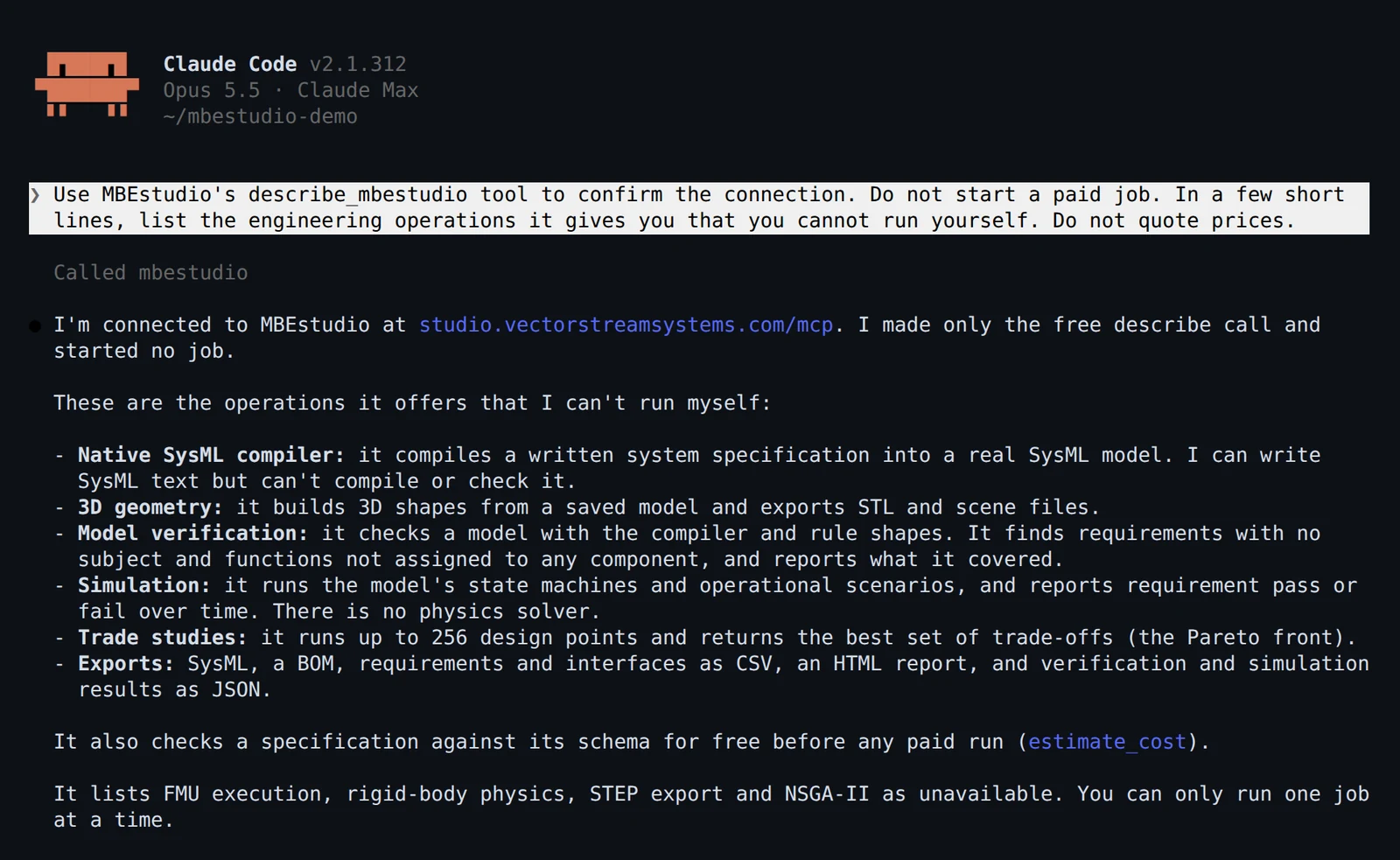
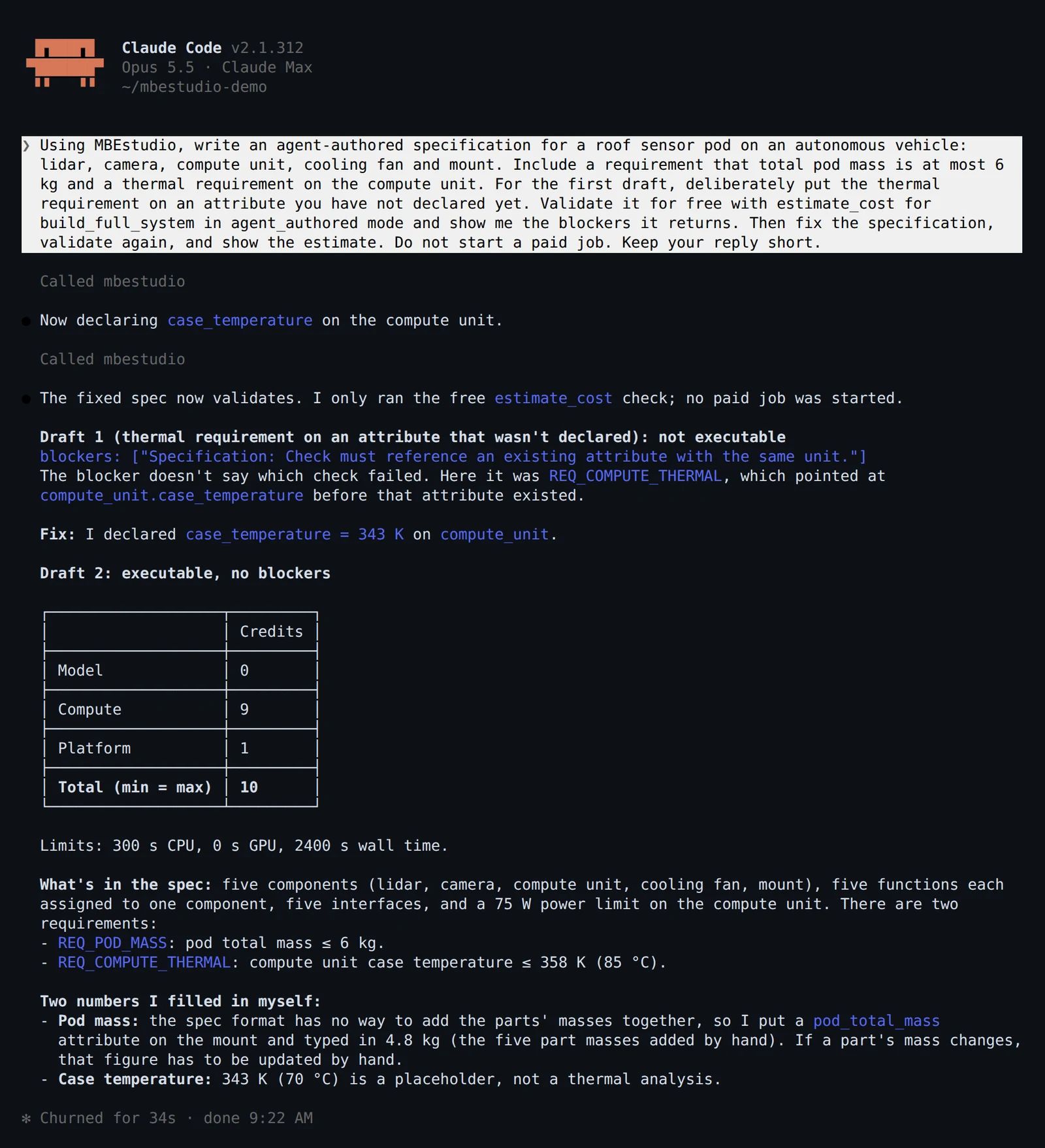
In a real session
01 / Choose how to run
Your agent supplies the structured specification. MBEstudio compiles and checks it without another model call.
Platform fee + compute
Read the specification schema ↗Use your provider key for the job. Your provider bills the model usage directly; MBEstudio charges for its tools and compute.
Platform fee + compute
The provider key is used in memory for that job and is never saved.
MBEstudio handles the model calls. Credits cover model usage at the configured markup, compute and the platform fee.
Model usage + platform fee + compute
Local GPU model execution will be available after the host's cost and resource limits are verified.
02 / Buy the capability you need
Every paid job starts with a maximum reservation. Unused credits return to your balance after settlement.
| Tool | What you receive | Platform fee |
|---|---|---|
generate_system_model | A compiled SysML system model with requirements and interfaces. | 1 credit |
build_3d_model | Placed envelopes or existing authored procedural geometry. | 1 credit |
run_simulation | Declared state-machine or operational scenario results. | 1 credit |
run_trade_study | A bounded sweep of existing model alternatives and objectives. | 1 credit |
verify_model | Compiler findings and the supported SHACL checks. | 1 credit |
export_model | An existing model, geometry or report format. | 1 credit |
build_full_system | Generation, geometry, verification and selected simulations in one job. | 1 credit |
CPU: $0.0001/second before markup. GPU: $0.001/second before markup. Model markup: 3x. Compute markup: 3x. Minimum paid charge: 1 credit. Rates and fees are approved.
Describe, estimate, balance, job status, result retrieval and cancellation have no tool charge. Results belong to the connection or key that paid for the job. Canceling settles work already consumed and returns the unused reservation.
03 / Estimate, then run
Ask your agent to show the estimate first. A job that exceeds your limit or balance is refused before model calls or paid compute start.
Long jobs return an ID immediately. Watch each generated section appear in your studio workspace, tagged via agent.
Open your studio account ↗estimate_cost({
"tool": "build_full_system",
"cost_mode": "agent_authored",
"specification": system_spec
})
// Show the returned estimate to the user.
// Use the user's approved spending limit.
build_full_system({
"cost_mode": "agent_authored",
"specification": system_spec,
"max_spend_credits": approved_limit,
"request_id": unique_request_id
})
get_job_status({ "job_id": job_id })
get_job_result({ "job_id": job_id })04 / Connect
Choose your app, add MBEstudio, and sign in with your account email. No API key needed.
Run these commands in your terminal to add the server and sign in through your browser.
codex mcp add mbestudio --url https://studio.vectorstreamsystems.com/mcp
codex mcp login mbestudio
Using the desktop app? Add this remote MCP server in Codex settings, or use the CLI commands with the same local Codex configuration.
Run this command. Then open Claude Code, run /mcp, and authenticate MBEstudio.
claude mcp add --transport http --scope user mbestudio https://studio.vectorstreamsystems.com/mcpOpen the installer, confirm the server in Cursor, then connect.
Add to CursorYou can also add a remote MCP server in Cursor's personal MCP settings using the URL below. Restart Cursor if it does not appear.
Open Settings, then Apps. Enable developer mode where available and create a custom MCP app named MBEstudio. Paste the server URL below and select OAuth authentication.
Custom MCP apps must be enabled for your account or workspace. MBEstudio has not been published in the app directory.
Open Settings, then Connectors. Add a custom connector named MBEstudio, paste the server URL below, and connect.
Run this command, or add the server to .vscode/mcp.json as an HTTP server. Then open Copilot Chat in agent mode, start MBEstudio from the tools list and sign in when VS Code asks.
code --add-mcp '{"name":"mbestudio","type":"http","url":"https://studio.vectorstreamsystems.com/mcp"}'https://studio.vectorstreamsystems.com/mcpUse your MBEstudio account email in the browser window. Review the app and return address, then choose Connect agent. You can disconnect it from your studio account at any time.
Connections can use prepaid credits within each job's spending limit. They cannot buy credits. Existing plans will receive agent credits only after their grants are confirmed.
Paste this message into your agent. It checks access without starting a paid job.
Use MBEstudio's describe_mbestudio and get_credit_balance tools to confirm the connection. Do not start a paid job.For scripts or clients that require a bearer token, open your studio account and expand Advanced under Connect your agent. Create a named key, copy it once and keep it in your client's secret storage.
Authorization: Bearer YOUR_API_KEYFor BYOK jobs, configure X-Provider and X-Provider-Key as secret headers on a dedicated connection. Never put either API key in a prompt or committed configuration. Clients without custom secret headers can use agent-authored or managed mode.
05 / Many agents, one model
Give each agent a subsystem of a saved model. Each one reads the contracts at its boundary, submits its work as a fragment, and the studio reconciles it against the current model. Port, item, unit and rate mismatches across subsystems, frozen interface changes, unallocated functions and untraced requirements come back as typed conflicts. You approve or reject each one; the model changes only when a proposal is committed. These tools are free.
| Tool | What it does |
|---|---|
mbe_get_context | Boundary contracts, frozen interfaces, allocated functions and requirements of one subsystem, and the baseline to generate against. |
mbe_submit_fragment | Stages the agent's subsystem with its provenance. The model is not touched. |
mbe_reconcile | Merges the fragment in context and returns a proposal with every change and every conflict. |
mbe_resolve_conflict, mbe_commit | Settle each conflict, then commit one changeset with stable IDs and provenance. |
mbe_export | Sends a subsystem and its dependencies into a package of a SysML v2 API tool, Cameo (XMI) or a .sysml file. Dry run first; updates never duplicate. |
mbe_drift, mbe_import_from | Shows what changed in the tool and brings it back as a proposal. |
mbe_get_context({ model_id, subsystem_id: "Robotaxi::NetworkSwitch" })
mbe_submit_fragment({ model_id, fragment: { subsystem, payload, provenance } })
mbe_reconcile({ fragment_id })
mbe_resolve_conflict({ conflict_id, resolution: { action: "reject" } })
mbe_commit({ proposal_id })
mbe_export({ model_id, subsystem_id, target, target_package: "Vehicle::Autonomy::Network", mode: "dry_run" })
Reconciliation and export are also in the studio under File, Federation, where proposals appear as agents submit them. How agent federation works.
Engineering scope
Simulation executes declared state machines, timers, guards and event traces. Trade studies evaluate the model's stated objectives and constraints. Geometry supports envelopes and authored procedural bodies. STEP envelope export and NSGA-II trades exist in the studio but are not yet enabled through the bounded agent worker. No fluid solver, rigid-body solver or FMU execution is included.
Agent outputs include SysML, STL, scene JSON, engineering CSV and HTML reports. Availability is reported by the server before a job starts.